Account Types Explained
Net Worth Navigator classifies your accounts into five buckets. Each bucket has different tax treatment, growth characteristics, and behavior in the simulation.
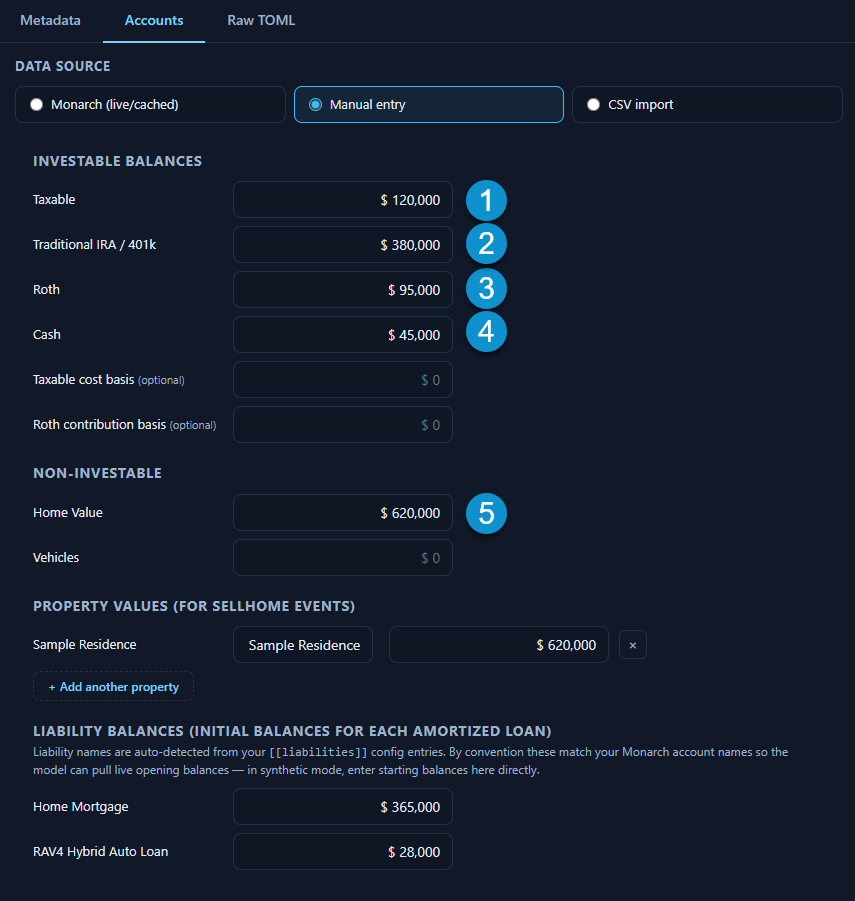
See the Manual Entry page for an annotated screenshot of where these buckets appear in the Setup Panel.
The Five Buckets
Section titled “The Five Buckets”What it is: Checking accounts, savings accounts, money market accounts, and any other liquid cash holdings.
Model behavior: Cash earns a separate return (typically lower than the blended investable return). It’s the first source for spending needs, and surplus routing refills it to the phase target before investing.
Tax treatment: Interest is taxable as ordinary income, but simplified in the model.
Taxable Brokerage
Section titled “Taxable Brokerage”What it is: Regular investment accounts — not tax-advantaged retirement accounts. Includes standard brokerage accounts and joint investment accounts.
Model behavior: Subject to capital gains taxation on withdrawals (simplified as a taxable fraction). Grows at the blended stock/bond return rate.
Tax treatment: Withdrawals trigger taxable income for the gain portion. The model tracks a cost-basis ledger.
Traditional IRA / 401(k)
Section titled “Traditional IRA / 401(k)”What it is: Pre-tax retirement accounts. Traditional IRA, traditional 401(k), and similar tax-deferred accounts.
Model behavior: Contributions reduce taxable income in the contribution year. Withdrawals in retirement are taxed as ordinary income. Subject to Required Minimum Distributions (RMDs) starting at age 73.
Tax treatment: Full withdrawal amount is taxable as ordinary income. This is typically the largest source of taxable income in retirement.
Roth IRA / 401(k)
Section titled “Roth IRA / 401(k)”What it is: After-tax retirement accounts. Roth IRA, Roth 401(k), and similar accounts.
Model behavior: Contributions are made with after-tax money. Contributions (not earnings) can be withdrawn at any time without penalty or tax. Qualified withdrawals in retirement are tax-free.
Tax treatment: No tax on qualified withdrawals. The model tracks contribution basis separately from earnings.
Home Equity
Section titled “Home Equity”What it is: Home value minus mortgage balance. Tracked through the home_value field and liability balances.
Model behavior: Home value grows at the inflation rate (or a configurable appreciation rate). A home’s equity is included in net worth but is not available for liquid spending — the model does not assume you’ll sell your home to fund retirement unless a SellHome event is configured.
Tax treatment: Home equity growth is not taxed in the model (principal residence capital gains exclusion is standard).
Owner Attribution
Section titled “Owner Attribution”For couples, retirement accounts (traditional IRA and Roth) can be attributed to each person:
- Person 1’s traditional IRA/401(k) → taxed on that person’s return
- Person 2’s traditional IRA/401(k) → taxed on that person’s return
- Person 1’s Roth IRA → tax-free, attributed to that person
- Person 2’s Roth IRA → tax-free, attributed to that person
Owner attribution matters for RMD calculations, Social Security taxation, and survivor-phase planning. The Accounts and Portfolio tabs in the projection show per-person breakdowns.
The Bucket Approach in Practice
Section titled “The Bucket Approach in Practice”When using Manual Entry, you add up the balances in each bucket and enter the totals:
- Add up all non-retirement investment accounts → Taxable brokerage
- Add up all pre-tax retirement accounts → Traditional IRA / 401(k)
- Add up all after-tax retirement accounts → Roth IRA / 401(k)
- Add up all cash accounts → Cash
- Enter your estimated home value → Home Value