Events & the Event System
Events are how you tell the model about things that will happen in the future — a planned expense, a career change, a home purchase, or retirement. They’re declared in your scenario TOML under [[events]].
How Events Work
Section titled “How Events Work”Each event has:
- A type that determines how it affects the model
- A year (or start/end years) specifying when it occurs
- An amount or other type-specific parameters
- An enabled flag — disable events without deleting them
Events can be singular (one year) or span multiple years. They can apply to one person or the household.
Event Types
Section titled “Event Types”| Type | Duration | What It Does |
|---|---|---|
Retire |
Permanent from year | Stops earned income for the specified person |
SocialSecurity |
Permanent from year | Adds Social Security income for the specified person |
Expense |
Singular or recurring | One-time cash outflow (medical, car, vacation) |
Income |
Singular or bounded | Adds income for a period (side gig, rental) |
EndOfPlan |
Permanent boundary | Marks a person’s modeled plan boundary and starts survivor behavior in couple plans |
BuyHome |
Singular | Adds a property and records its down payment; finance it separately as a liability |
SellHome |
Singular | Converts a named property to cash proceeds |
NewJob |
Permanent from year | Replaces a person’s income from that year |
CareerBreak |
Bounded | Zeroes a person’s earned income for a period |
Education |
Bounded | Subtracts annual cost for a period |
Marriage |
Singular | Informational (future: tax filing status change) |
SpendingShift |
Singular or bounded | Changes baseline spending (replace mode) |
ContributionChange |
Permanent from year | Overrides or adjusts a person’s contribution settings |
Retire
Section titled “Retire”[[events]]enabled = truetype = "Retire"person = "person1"year = 2038Sets that person’s earned income to zero from the specified year onward. Also triggers retirement-phase spending and withdrawal policies.
EndOfPlan
Section titled “EndOfPlan”[[events]]enabled = truetype = "EndOfPlan"person = "person1"age = 90year = 2062Marks the person’s modeled plan boundary, rather than predicting a life outcome. In the Setup Panel you enter the age and it computes the year from the date of birth. For couples, the next model year begins survivor behavior for the remaining person.
SocialSecurity
Section titled “SocialSecurity”[[events]]enabled = truetype = "SocialSecurity"person = "person1"year = 2035Adds monthly income from the specified year onward. The event’s year is the source of truth for claim timing. Its monthly amount is looked up live from that person’s social_security_benefits table at the resolved claim age; it is never stored on the event. Create this event explicitly—NWN no longer synthesizes it from person-level fields.
See Social Security Benefits for how to get your benefit estimates from ssa.gov and enter them in your scenario.
Expense
Section titled “Expense”[[events]]enabled = truetype = "Expense"label = "Kitchen remodel"year = 2028amount = -45000A one-time cash outflow. Negative amounts reduce liquid assets. Optional funding = "cash_reserve_first" lets that expense draw from cash below target before touching retirement buckets.
Recurring Events
Section titled “Recurring Events”Events can repeat using three fields:
[[events]]enabled = truetype = "Expense"label = "Annual travel"year = 2027amount = -8000repeat_every_years = 1repeat_until_year = 2045| Field | What It Does |
|---|---|
repeat_every_years |
How many years between repeats |
repeat_until_year |
The last year the event repeats |
repeat_count |
Alternative: repeat exactly N times (ignored if repeat_until_year is set) |
For readability on the chart, set chart_first_occurrence_only = true to show annotations only for the first occurrence.
Income
Section titled “Income”[[events]]enabled = truetype = "Income"label = "Side consulting"year = 2027amount = 15000end_year = 2029Adds annual income for the specified period. Positive amounts increase cash flow.
BuyHome / SellHome
Section titled “BuyHome / SellHome”[[events]]enabled = truetype = "BuyHome"label = "Move to coast"year = 2032down_payment = -80000price = 450000
[[events]]enabled = truetype = "SellHome"label = "Sell current home"year = 2032property = "Primary Residence"sale_fee_rate = 0.06BuyHome records a new property and subtracts the down payment. Add a named liability separately if the purchase is financed; mortgage rate and term fields on a BuyHome event are not modeled. SellHome converts a named property to cash, net of sale fees and any linked mortgage payoff. Reinvestment into a specific bucket is supported via reinvest_to.
NewJob / CareerBreak
Section titled “NewJob / CareerBreak”[[events]]enabled = truetype = "NewJob"person = "person2"year = 2026annual_income = 85000
[[events]]enabled = truetype = "CareerBreak"person = "person1"start_year = 2030end_year = 2031NewJob replaces a person’s income from that year. CareerBreak zeroes income for the specified period.
SpendingShift
Section titled “SpendingShift”[[events]]enabled = truetype = "SpendingShift"label = "Downsize lifestyle"year = 2040mode = "replace"retirement_annual = 65000survivor_percent_of_retirement = 0.70Changes the baseline retirement spending from the specified year. Currently supports mode = "replace" which replaces the scenario’s spending parameters.
ContributionChange
Section titled “ContributionChange”[[events]]enabled = truetype = "ContributionChange"label = "Increase 401(k) after mortgage payoff"person = "person1"year = 2030annual_401k_contribution_delta = 6000Changes one person’s contribution settings from the specified year onward. An event can set new absolute amounts, apply dollar deltas, or override percent-of-gross settings. Later events for the same person take precedence for fields they specify.
Organizing Events in the Gantt Timeline
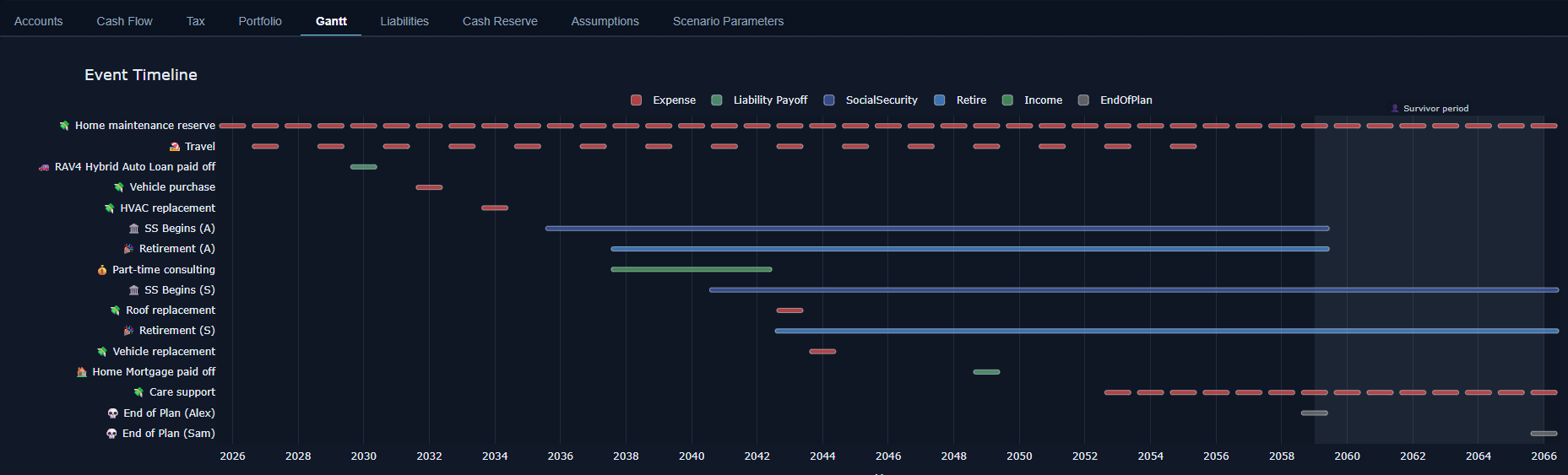
Section titled “Organizing Events in the Gantt Timeline”The Gantt tab shows all enabled events across the projection timeline. Milestone events (retirement, SS start, singular expenses) appear as single markers. Span events (career breaks, education periods) appear as horizontal bars. Survivor periods are shown as a shaded band.
Toggling Events
Section titled “Toggling Events”Every event can be toggled on and off by changing enabled = true to enabled = false. No need to delete entries — just disable them. This is useful for comparing the impact of a specific event (e.g., “what if we don’t buy the vacation home?”) without creating a separate scenario.